ShipShipped on its own
Your tests passed, a second AI could not break it, and it went into your code under your name.
In daily use since August 2026
Triaged reads your code, your bug list and what your app did in production, and picks work up within five minutes, day or night. This is what you wake up to.
✓New teams start in Review mode: every fix waits for your OK, and nothing reaches your customers without you.
Your morning7:40 am
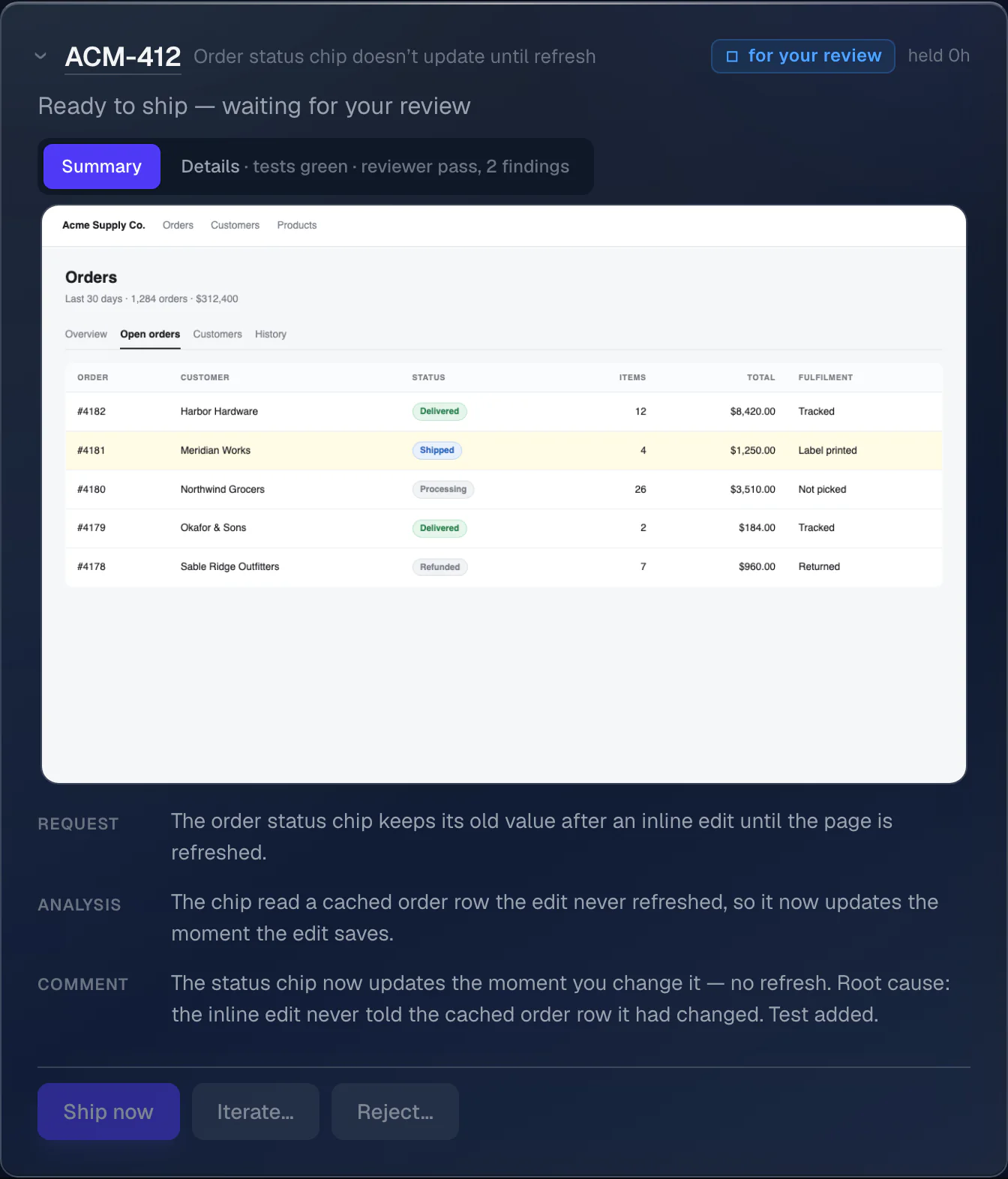
Fixed. The order status now updates by itself. A second AI checked the fix; screenshot attached.
Written. The setup guide for the new export API, as a PDF on the ticket. Every claim points at the code it came from.
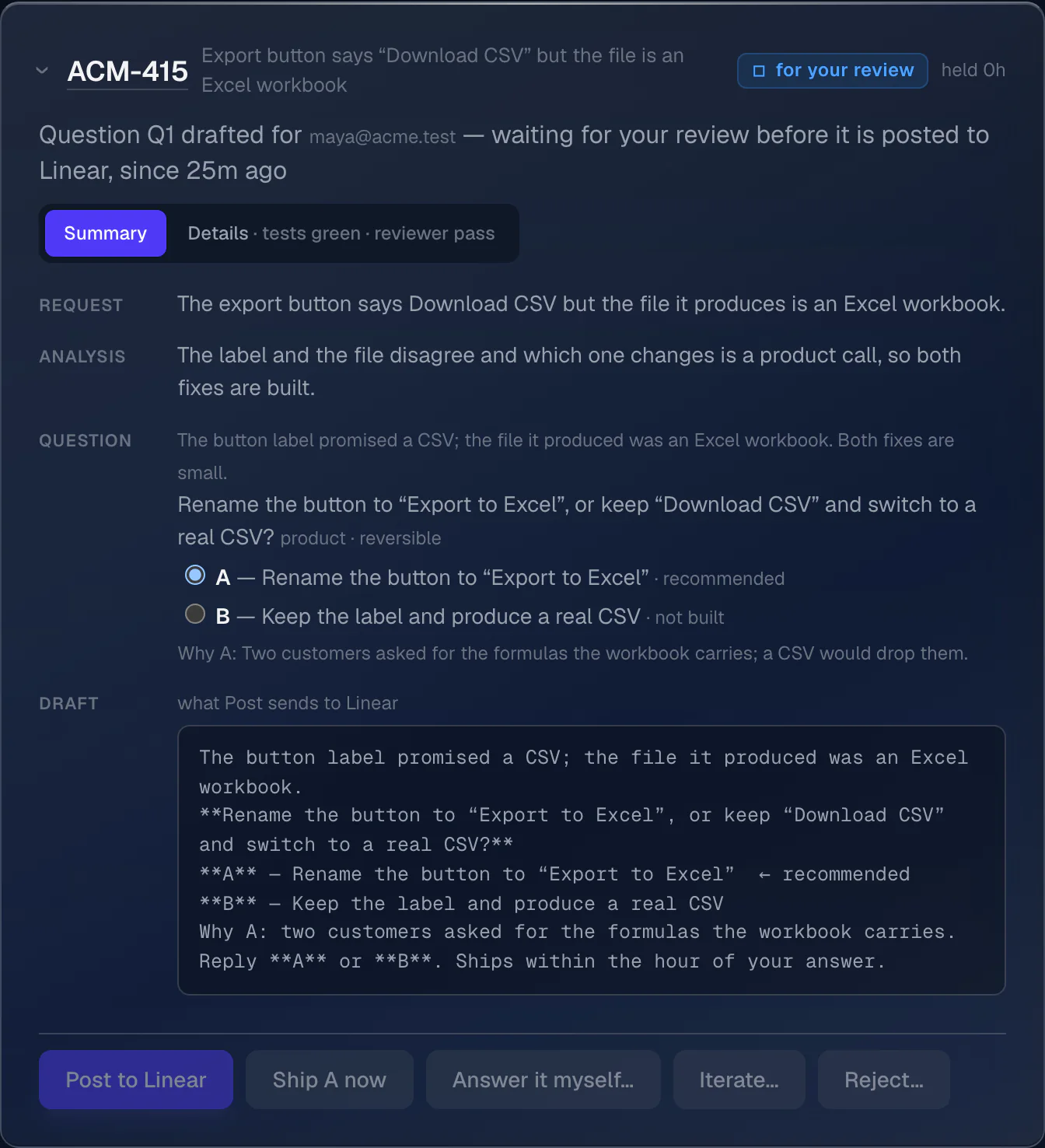
Your call. “Download CSV” gives an Excel file. Rename the button, or make a real CSV? It recommends the rename.
Waiting for you. The crash on the refunds page is fixed, but the fix touches billing, so it waits for your OK.
Approve? Company email is failing a check. The fix is a setting at your domain provider; a vetted human can do it for $50.
Five overnight, one answered in Slack at midnight. Three calls left for you, each with a recommendation.
How it works
Someone on your team files a bug: “Order status doesn’t update until you refresh.”
A bug report · ACM-412 — a clean fix ships on its own
Someone on your team files a bug: “Order status doesn’t update until you refresh.”
Ten quiet minutes later it starts: a private copy of the code, the bug reproduced, a fix and a test.
All your tests pass. It takes a screenshot the way the person who reported the bug would see it.
A second AI, independent of the first, tries to break the fix and checks it against every comment people left on the bug.
Clean. In Auto mode the fix goes into your code, and the bug is marked for your review with a note and the picture.
App feedback · ACM-415 — a product call becomes one question
From your app’s feedback button: “Export says Download CSV but the file is Excel.” The page and a recording of it attached.
The label and the file disagree. Both fixes are small, so it builds and tests both. Which one is a product call.
The second AI confirms this is a product decision, not a code one, and that the recommendation holds up.
One question lands in your tracker, once, with a recommendation: A — rename the button to “Export to Excel”, or B — a real CSV.
A crash · ACM-418 — rejected, repaired, one finding stands
Your crash reporter files it by itself: a crash on the refunds page, the technical details attached, marked major.
Private copy, cause found, fix written, test added. Everything passes.
The second AI rejects it: the fix hides the error, and old orders with no customer would still be wrong.
It repairs what the reviewer found and a fresh review checks it again. At most twice, never forever.
One finding stands after the repair: it touches billing. Your call, so it waits for you with the fix, tests, picture and findings.
A question · asked in Slack, answered in the thread
Someone working late asks in Slack: “Why does the nightly payout job skip on Sundays?” Nobody else is awake to answer.
It reads the code the way it would to fix it — a private copy, nothing changed — and finds the answer in there.
Ninety seconds later the answer is in the thread, with the exact lines it came from. What it cannot point at, it does not send.
A document · a ticket that wants writing, not code
A ticket asks for something written, not changed: “Write the setup guide for the new export API.” There is no bug here and nothing to fix.
It reads what the guide is about and writes it from the code that is actually there, not from what the last guide said.
The guide lands on the ticket as a PDF, every claim pointing at the code behind it. Nothing was changed to write it.
A failed check · ACM-421 — the fix is outside the code
One of its own checks sees the company’s email failing and files a ticket by itself. Nobody has noticed yet.
The cause is outside the code: a setting at the company’s domain provider. Nothing to change in the app.
It may not change domain settings itself, so it drafts a $50 job for a vetted human on Natural Intelligence and waits for your approval.
The morning · you, over coffee
Five lines: a bug fixed, a guide written, a question, a fix waiting for your OK, a job to approve. The Slack one sorted itself at midnight.
You reply “A” on the question. The rename goes in within the hour; the tests and the review are already done.
You read the finding and tap Ship. It goes in under your name.
You approve the job. A vetted human fixes the record, it is verified for 24 hours, then they are paid.
Six asks overnight: diagnosed, fixed, tested, reviewed, answered, written up. You made three calls, each recommended, in four minutes.
What comes back
Your tests passed, a second AI could not break it, and it went into your code under your name.
A question comes back in the thread, or in your own Claude, in about ninety seconds; a ticket that wants writing comes back as a document.
A decision only a person can make, asked once, with lettered options and a recommendation. It ships within the hour.
Whatever the second AI could not clear waits with the fix, the test result and the picture. Ship it, send it back, or reject it.
It becomes a job for a vetted human on Natural Intelligence: you approve it first, and they are paid only once the fix is verified.
One button ships it under your name. The others send it back with notes, or reject it.
It names who decides, states the options, and says which one it would pick and why.
Guardrails
Every one of these is a switch or a mechanism on the dashboard, not a promise in a slide.
Setup
Connected in a few clicks, through app installs and sign-ins you can revoke. Nothing to paste.
Your code and your bug list, so it can work the list and put the fixes back. What your app actually did when it broke, so a diagnosis is never a guess. And Slack or your own Claude, where anyone can just ask it.
Add triaged.xyz to Claude and your Claude knows your project: how your data fits together, what is waiting for you, and the answer to a question with the code behind it. It works as you, under your own sign-in, and the big calls (a release, anything that costs money) stay on the dashboard.
MCP connector at https://triaged.xyz/mcp · claude.ai, Claude Desktop, Claude Code or any MCP client · sign in with Linear, Google, GitHub or Slack · read-only, or everything your role allows · revoke it on the dashboardHow to connect →Up and running within a minute of connecting your code, in Review mode.
Get in
Triaged is in private use. Tell me what your team is chasing and I’ll be in touch within a day.